Get the complete package
Everything to replicate this system — the full setup tutorial, the zero-dependency Notion API wrapper, and a ready-to-import CSV of 320+ H1B sponsors.
Job searching is a full-time job. And I mean that literally. You wake up, open five tabs, scroll through Indeed, check LinkedIn alerts, skim Glassdoor, copy links into a spreadsheet, wonder if you already applied to that “Senior Software Engineer” at Stripe or if that was the “Staff Software Engineer” at Stripe, realize you forgot to follow up with the recruiter from two weeks ago, and by the time you’ve done all of that, three hours have evaporated and you haven’t actually applied to anything.
I got tired of it. So I built a system that does all of it while I sleep.
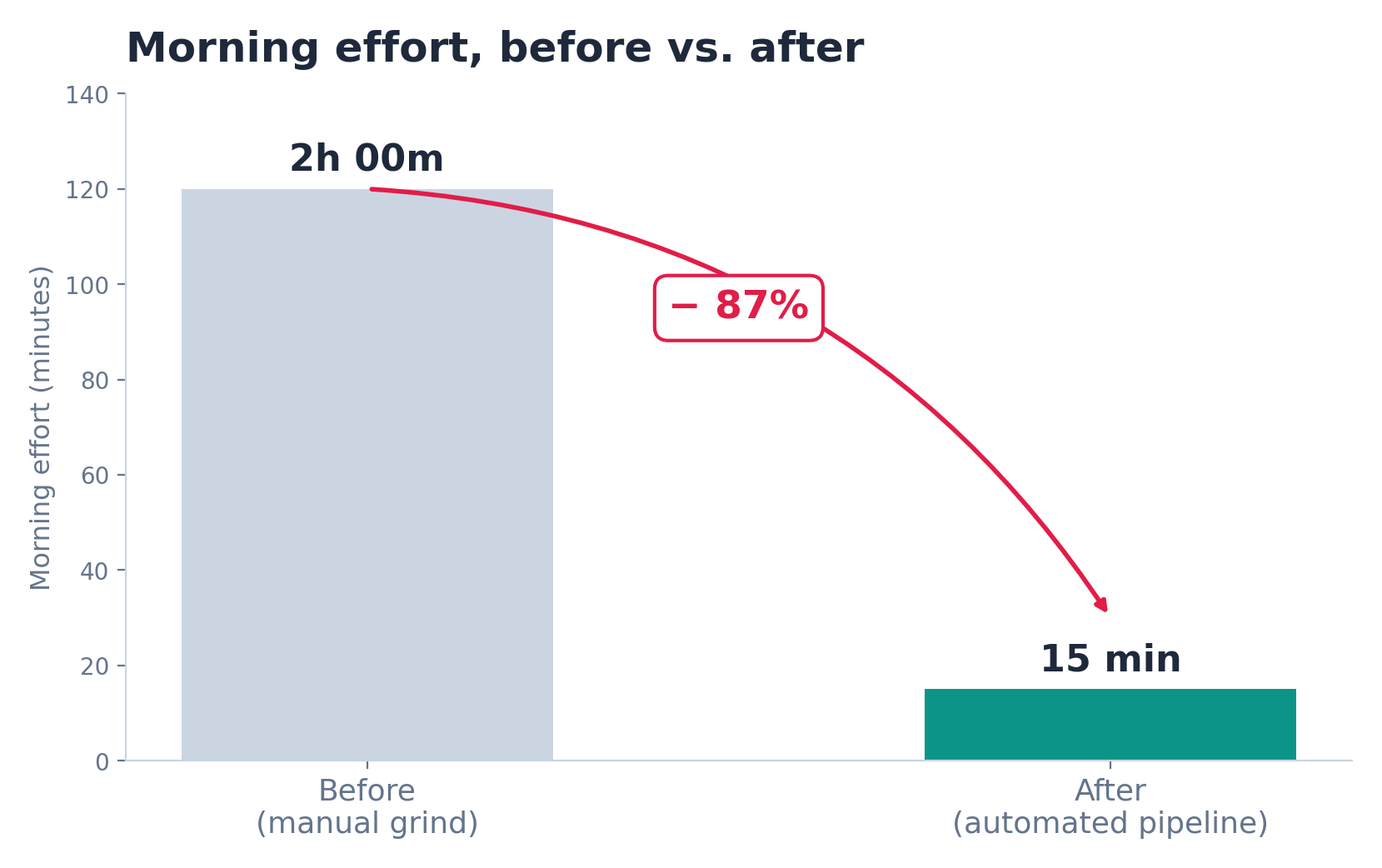
Six automated tasks run every night on Claude Cowork. By the time I wake up, my Notion tracker has fresh, scored, deduplicated job leads. Referral emails are drafted. A daily briefing is sitting in my inbox with a pipeline tally, follow-up reminders, and the top jobs to apply to today. My total morning effort went from two hours of grinding to about fifteen minutes of reviewing and clicking “Apply.”
This post walks through everything: the architecture, the scoring rubric, the deduplication logic, the referral blurb system, the technical gotchas, and the tools I built to make it all work. If you’re job searching and know your way around Notion, this might save you dozens of hours.
The Problem
I was tracking my job search in a Notion board. Manually. Every day I’d search Indeed, check my email alerts from LinkedIn and Glassdoor, copy the interesting ones into my tracker, score them in my head, and try to remember which ones I’d already seen. It broke down in predictable ways:
It didn’t scale. On a good day I could review maybe 30-40 postings across all sources. But I was subscribed to alerts for multiple roles across multiple cities. The volume was easily 100+ new postings per day if you counted everything. I was missing things constantly.
Deduplication was a nightmare. The same “Senior Backend Engineer” at Coinbase would show up on Indeed, LinkedIn, AND Glassdoor. Sometimes with slightly different titles. Sometimes with different cities listed even though the role was remote. I’d waste time evaluating the same job three times, or worse, add it to my tracker twice and not realize until later.
Follow-ups fell through the cracks. I’d apply somewhere, get a confirmation email, and then… forget about it. No systematic way to track which applications needed follow-ups, which recruiters I’d heard back from, which referrals had gone out.
Visa sponsorship added a whole extra layer. I need H1B sponsorship, which means a huge chunk of otherwise-great jobs are off the table. Figuring out which companies sponsor — and which specific postings mention it — requires reading through every single job description. It’s tedious and easy to miss.
Writing referral emails for every job was soul-crushing. I had people willing to refer me at various companies, but writing a personalized “introduction blurb” for each job took 15-20 minutes. Multiply that by the 5-10 referral-worthy jobs I found each week, and it was hours of repetitive writing.
I needed a system, not a spreadsheet.
The Architecture
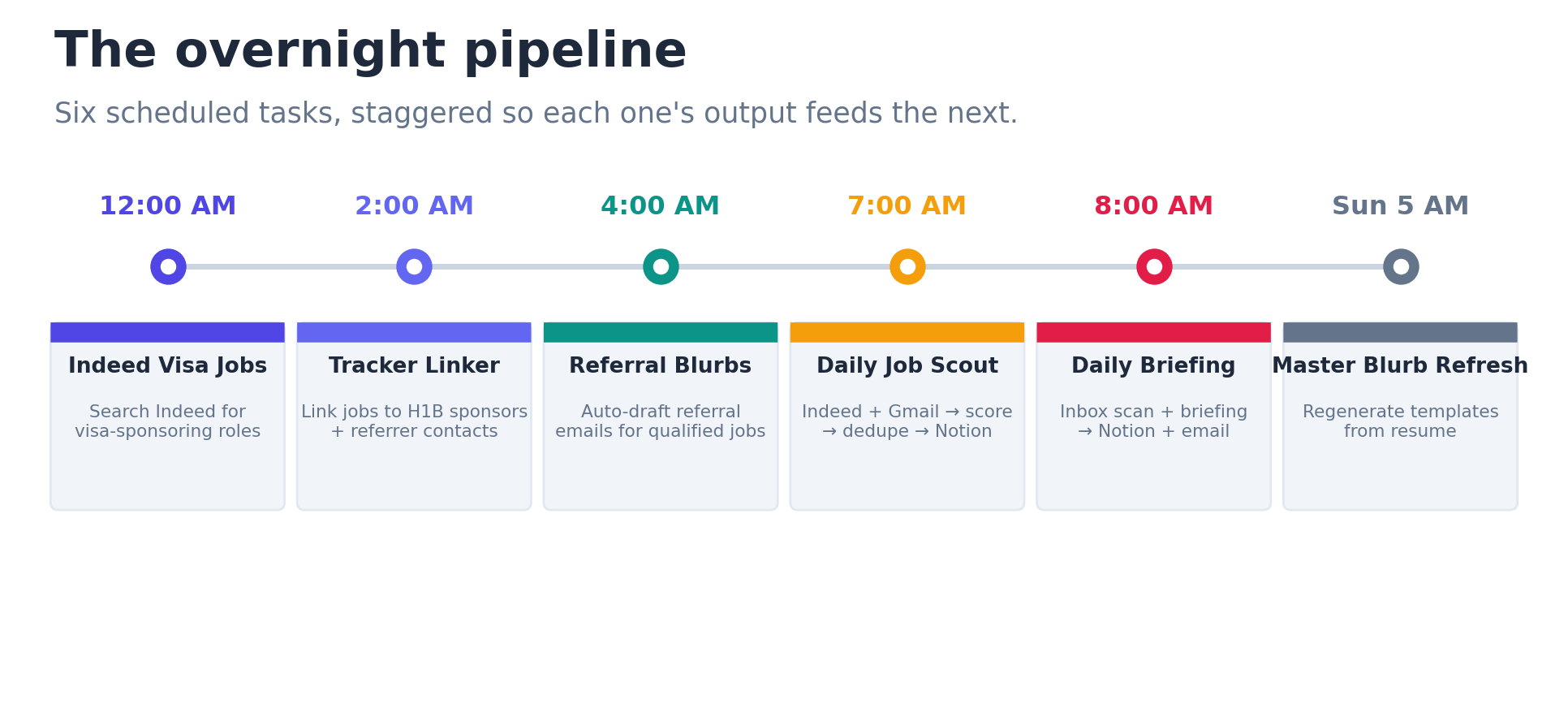
The solution is a pipeline of six scheduled tasks in Claude Cowork, each running at a staggered time overnight so the output of one is ready for the next:
12:00 AM  -->  Indeed Visa Jobs       Search Indeed for visa-sponsoring roles
 2:00 AM  -->  Tracker Linker         Link jobs to H1B sponsors + referrer contacts
 4:00 AM  -->  Referral Blurbs        Auto-draft referral emails for qualified jobs
 7:00 AM  -->  Daily Job Scout        Main pipeline: Indeed + Gmail --> score --> dedupe --> Notion
 8:00 AM  -->  Daily Briefing         Inbox scan + full briefing --> Notion + email
 Sun 5AM  -->  Master Blurb Refresh   Regenerate referral templates from resume
Eight Notion databases power the whole thing: Job Tracker (the main board), H1B Sponsors (a reference table of 320+ known sponsors), Indeed Jobs Tracker (staging area for the visa-focused search), Master Referral Blurbs (reusable email templates), Referral Blurbs (personalized output), ReferrerList (companies where I have contacts), Referrer Follow-ups (tracking cadence), and Task List (daily action items).
The connectors are: Notion, Gmail, Indeed, Make (for sending styled HTML emails and creating Google Tasks), and iMessage (optional, for mobile push notifications). The whole thing runs on Claude’s scheduled task infrastructure, which is essentially cron-for-AI. You write a prompt, set a schedule, and Claude executes it autonomously at the specified time.
Let me walk through each major component.
How Scoring Works
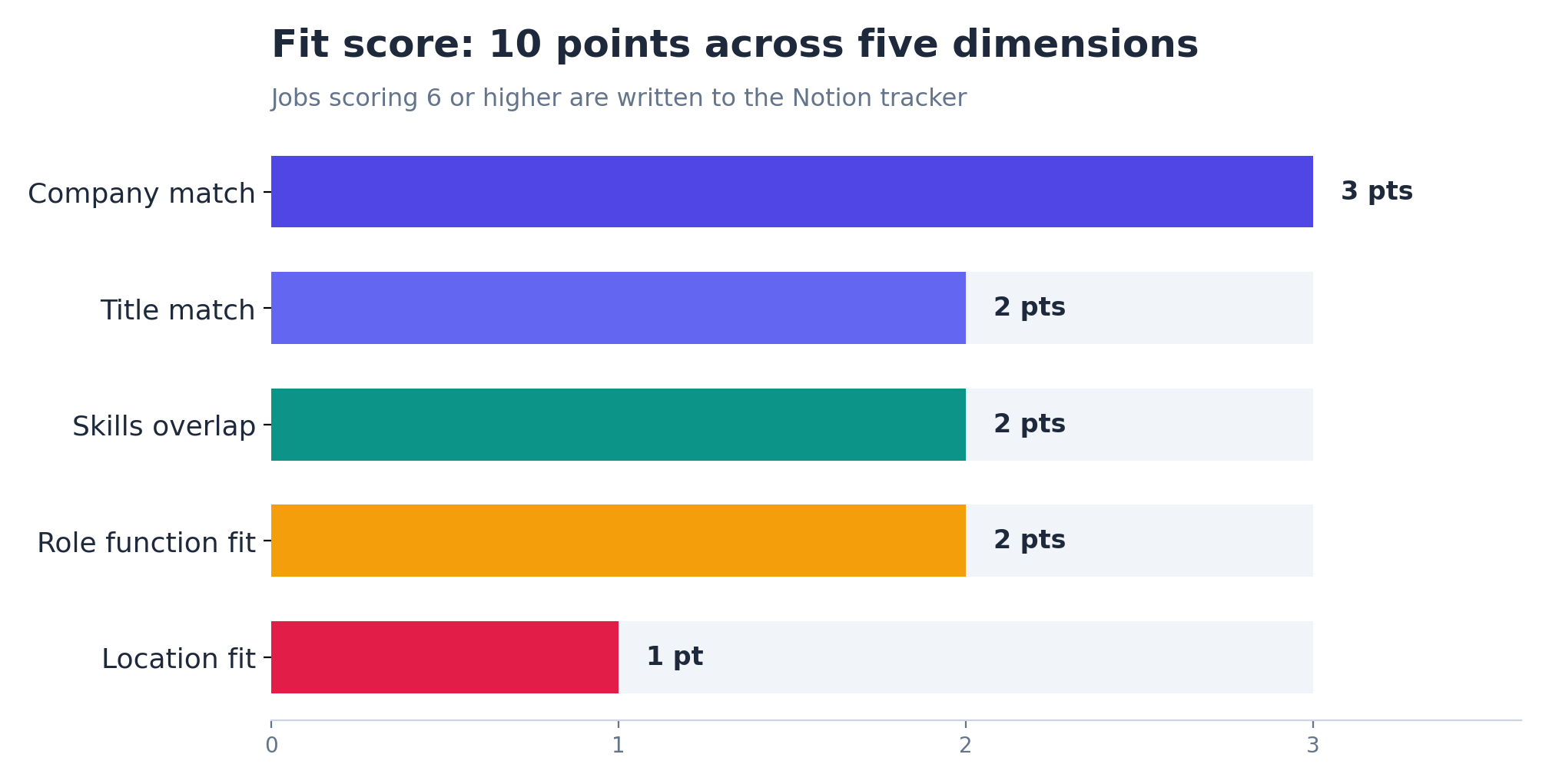
Every job that enters the pipeline gets a fit score from 1 to 10. The rubric has five dimensions, and I tuned the weights to reflect what actually matters to me:
Title match (up to 2 points). How close is the job title to my target roles? An exact match like “Senior Software Engineer” gets the full 2. A related title like “Platform Engineer” gets 1. Something tangential like “Technical Project Manager” gets 0. Seniority also factors in — if I’m targeting mid-to-senior roles, an “Intern” or “VP” gets penalized.
Company match (up to 3 points). This is the heaviest weight, and intentionally so. I maintain three tiers of target companies. High-likelihood targets (companies where I have referrals, alumni connections, or a strong skill match) get 3 points. Medium-likelihood targets (good companies that fit my background but no special advantage) get 2. Any reputable, recognizable company not on either list gets 1. Companies on my skip list (already rejected, bad cultural fit, wrong industry) get 0. This single dimension does a lot of the heavy lifting in separating signal from noise.
Skills overlap (up to 2 points). I maintain a list of must-have skills in my profile — languages, frameworks, infrastructure tools, practices. The scoring step checks how many of these appear in the job description. A JD that mentions four of my core skills scores higher than one that mentions one.
Location fit (up to 1 point). I have tiered city preferences. Remote roles and my Tier 1 cities get the full point. Tier 2 cities get 0.7. Tier 3 cities get 0.5. This is a lighter weight because location is usually negotiable, but it still moves the needle.
Role function fit (up to 2 points). Beyond the title, how well does the role’s actual function match my strengths and interests? A “Software Engineer” role focused on payment infrastructure scores differently than one focused on frontend design systems, even though the title is the same.
The threshold: jobs scoring 6 or higher make it to the tracker. Below that, they’re logged in the daily summary but not written to Notion. I started at 7 and found I was missing good opportunities, so I dropped it to 6. You could go lower for more volume or higher for less noise. It’s a single number to change.
Deduplication — Harder Than You’d Think
This was one of the trickiest engineering problems in the whole system, and honestly, it still isn’t perfect. But it’s vastly better than doing it by hand.
The same job appears on multiple sources constantly. A “Senior Software Engineer” posted on Indeed will also show up in my LinkedIn email alert and maybe on Glassdoor too. That’s the easy case: same title, same company, different sources. A simple company-plus-title match catches it.
But then you get the hard cases. “Sr. Software Engineer” versus “Senior Software Engineer” versus “Software Engineer, Senior.” Same role, different title formatting. Or “Staff Software Engineer” versus “Senior Software Engineer” at the same company, which might actually be two different roles. Or the same role at the same company listed in three different cities, even though it’s remote.
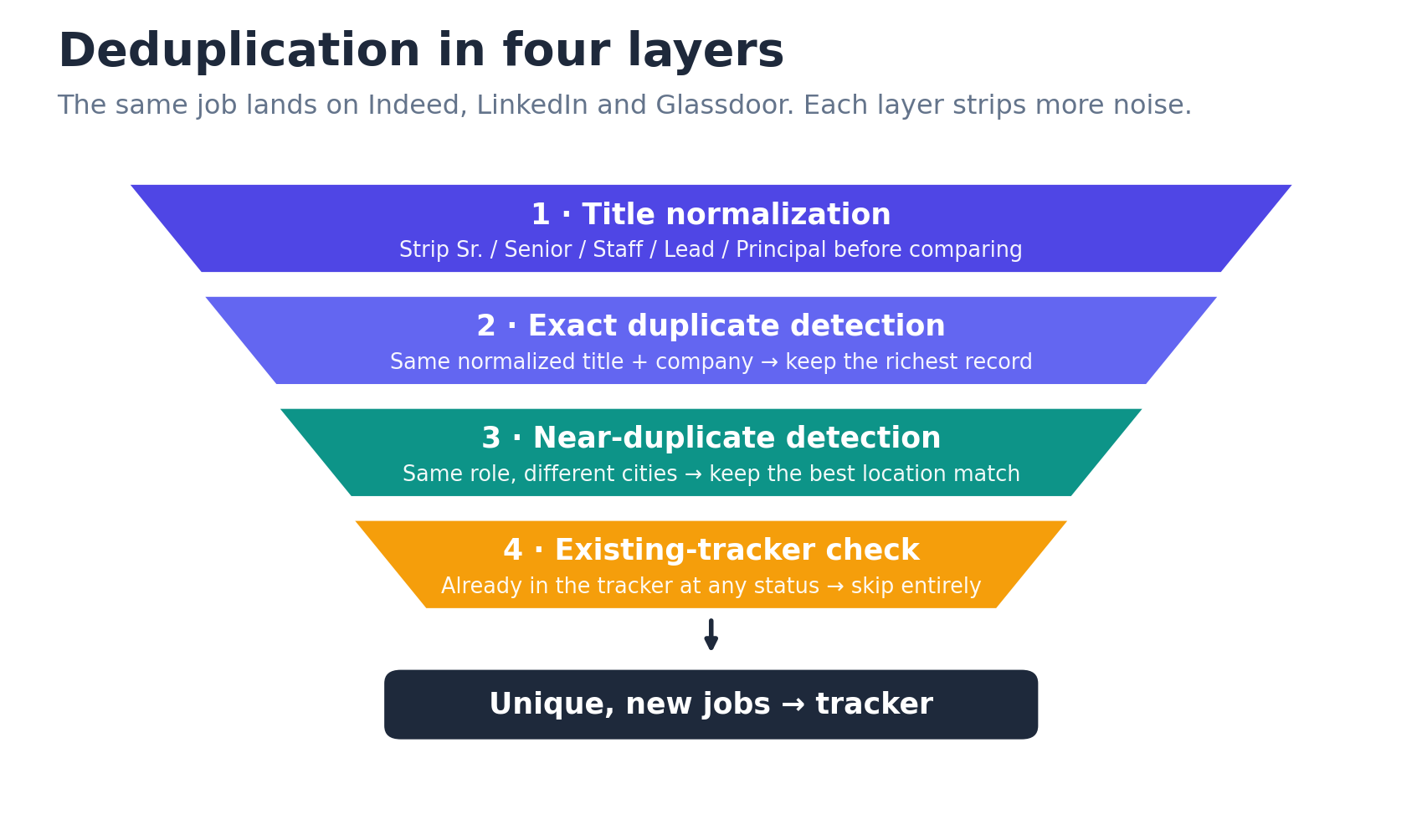
The deduplication logic works in layers:
First, title normalization. Strip seniority modifiers (Sr., Senior, Staff, Lead, Principal) before comparing. “Sr. Backend Engineer” and “Senior Backend Engineer” become the same thing after normalization.
Second, exact duplicate detection. Same normalized title at the same company across sources? Keep the one with the richest data (usually the one where we could fetch the full JD).
Third, near-duplicate detection. Same company, same role family, different cities? Keep the best location match according to my tier preferences.
Fourth, existing tracker check. Before writing anything to Notion, search the Job Tracker for a matching company-plus-role combination. If it already exists at ANY status (including “Rejected”), skip it entirely. This prevents the system from re-adding jobs I’ve already evaluated and passed on.
It’s not foolproof. “Product Marketing Manager” and “Senior PMM, Growth” at the same company will slip through as two different entries. But it catches the vast majority of duplicates, and the remaining ones are easy to spot during my morning review.
The Two-Layer Referral Blurb System
This is probably the component I’m most proud of, because it solved a problem that was genuinely eating hours of my time every week.
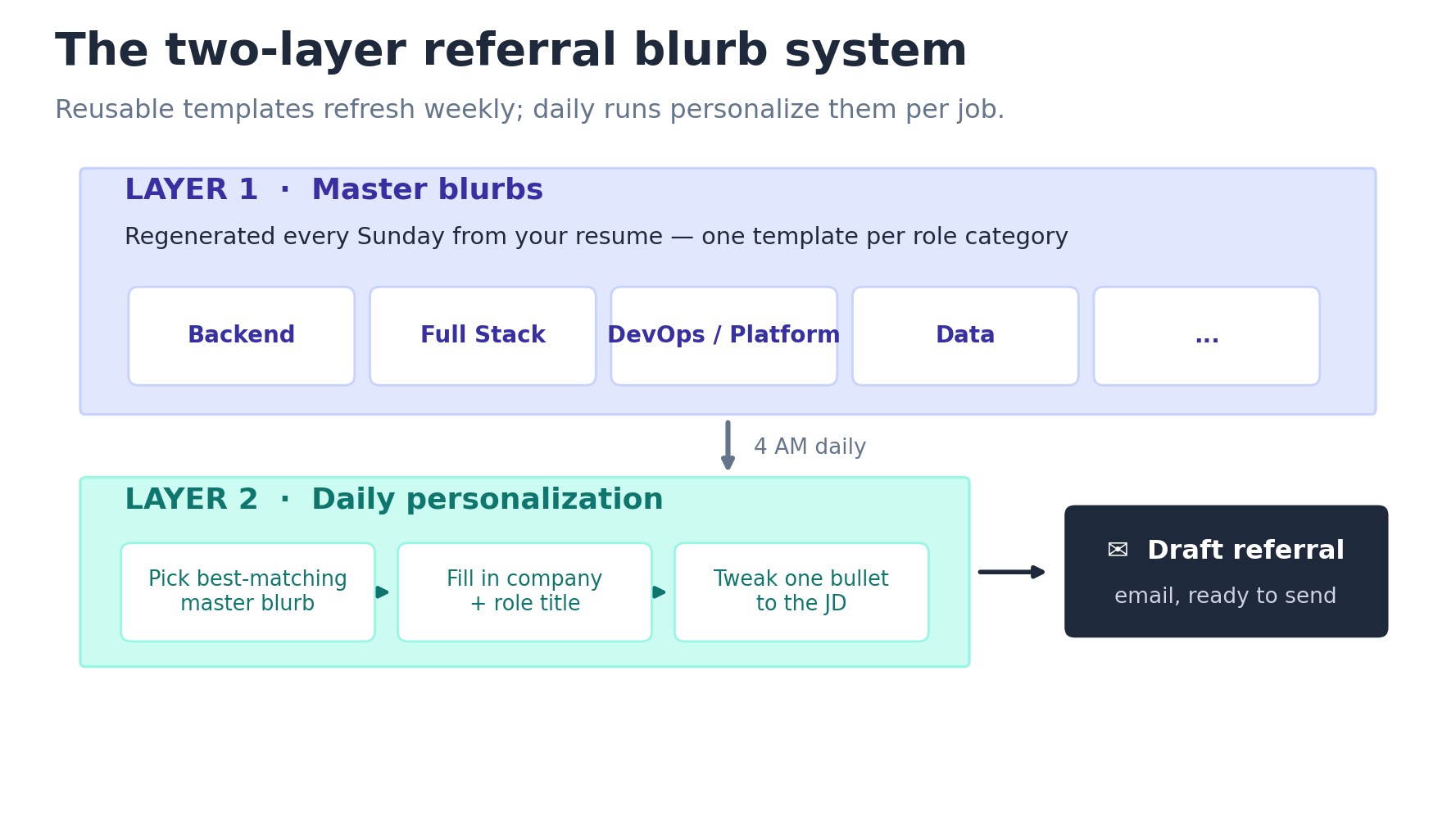
The system has two layers:
Layer 1: Master blurbs. These are reusable referral email templates, one per role category. I have categories like “Backend Engineering,” “Full Stack Engineering,” “DevOps/Platform,” and so on. Each master blurb is a complete referral email with placeholders for the company name, role title, and hiring manager’s name. It’s written in third person, as if a friend is referring me. The structure is always: opening line, one anchor sentence about my background, three bullets highlighting relevant achievements, a closing paragraph, and “resume is attached.”
These master blurbs are regenerated every Sunday from my actual resume by the Weekly Master Blurb Refresh task. This means they always reflect my latest experience and achievements. I update my resume, and the blurbs update themselves.
Layer 2: Daily personalization. Every morning at 4 AM, the Referral Blurbs task finds jobs in my tracker that have H1B sponsorship and don’t yet have a referral email drafted. For each one, it picks the best-matching master blurb (based on the job’s category), fills in the company and role title, and optionally tweaks one bullet based on the actual job description. If the JD mentions a specific requirement that my master blurb doesn’t cover, the system lightly rewords one bullet to address it. It doesn’t rewrite the whole email. It doesn’t hallucinate new achievements. It makes one small adjustment to improve relevance.
The style rules are specific and deliberate. No em-dashes (they feel too formal for a friendly referral). Qualitative numbers instead of exact figures (“ran a budget of about $25M” reads more like a friend talking than “$24,847,291”). Three to four bullets maximum. Concise. Warm but professional. End with “resume is attached” and “Best,” — ready for the referrer to copy, tweak, and send.
The result: every morning, I have draft referral emails waiting in my Notion tracker for every new qualified job. Instead of writing each one from scratch, I spend 30 seconds reviewing the draft, maybe changing a word or two, and forwarding it to my contact. What used to take 15-20 minutes per job now takes under a minute.
H1B Sponsor Matching
For anyone else navigating the visa sponsorship landscape, this piece might be the most practically useful.
I built a database of 320+ known H1B sponsors from public Department of Labor OFLC data. These are companies that have actually filed H1B petitions, so the data is based on real sponsorship activity, not just what their careers page says.
The matching logic normalizes company names before comparison. This matters because company names are inconsistent across sources. “Stripe, Inc.” on Indeed becomes “Stripe” on LinkedIn becomes “Stripe Inc” on Glassdoor. The normalization process: lowercase everything, strip punctuation, strip leading “The,” strip legal suffixes (Inc, LLC, Corp, Co, Ltd, LP, Holdings, Group, USA, US), and collapse extra whitespace. After normalization, “Stripe, Inc.” and “stripe” and “Stripe Inc” all resolve to “stripe” and match.
There’s also a containment check for parent-subsidiary relationships. “Amazon Web Services” normalizes to “amazon web services,” and since “amazon” is a substring, it matches the “Amazon” entry in the H1B database. This catches cases like Google/Alphabet, Meta/Facebook, and Microsoft/GitHub without needing to maintain a separate alias table. (I do maintain brand aliases for a few tricky cases, but the fuzzy matching handles most of them.)
The H1B Sponsors database is included in the tutorial as a CSV file. You can import it directly into Notion and have a working sponsor reference table in minutes.
The Daily Briefing
The daily briefing is the culmination of everything. It runs at 8 AM, after all the other tasks have finished, and it does three things:
First, it scans my Gmail. It looks for job-related emails from the past 24 hours: application confirmations, rejections, recruiter outreach, interview invitations, referral confirmations. For each one, it classifies the email and takes appropriate action in the tracker. A rejection email? Status gets set to “Rejected” with a short encouraging note. An application confirmation? Status moves to “Applied.” A recruiter reaching out? A task item gets created in both Notion and Google Tasks so I don’t forget to respond.
Second, it computes a full briefing. This includes: jobs to apply to today (sorted by fit score, split by freshness), new leads since yesterday, companies where I should find a referrer, applications that need follow-up (last activity more than 5 days ago), a pipeline tally by status, and referrer follow-ups that are due.
Third, it publishes everywhere. The briefing goes to a dedicated Notion page (archived by month, week, and day for historical reference), and a styled HTML email arrives in my inbox via Make. The email has inline CSS formatting, clickable job links, fit score badges, and tier indicators. It looks polished. It feels like a product, not a cron job.
The whole thing means I can start my morning by scanning one email. If I want more detail, I click through to the Notion page. If something needs immediate action, it’s already flagged. The cognitive overhead of “what should I be doing for my job search right now?” is reduced to zero.
Technical Gotchas and Lessons Learned
Building this system was not a smooth ride. Here are the problems that cost me the most time:
Gmail label queries are silently broken if you get the syntax wrong
Gmail labels with slashes in them (like “Jobs/LinkedIn” or “Jobs/Glassdoor”) MUST be wrapped in double quotes in search queries. The correct syntax is label:"Jobs/LinkedIn". If you write label:Jobs/LinkedIn without the quotes, Gmail silently returns zero results. No error. No warning. Just an empty result set. I spent an embarrassing amount of time debugging “why is my LinkedIn alert parser finding nothing?” before discovering this.
The Notion MCP connector has a 25-result cap
This one is a hard limit in the Notion MCP connector that Claude uses. Every database query returns a maximum of 25 results. If your Job Tracker has 200 rows and you search for all “New” status jobs, you get 25. There’s no pagination parameter. There’s no “give me the next page” option. Just 25.
For the scheduled tasks, this mostly works fine because they’re processing recent entries (last 24 hours, last 7 days). But for any kind of analytics or bulk operation, it’s a dealbreaker. That’s why I built the Python wrapper.
Data source IDs are confusing and non-obvious
The Notion MCP connector uses collection:// IDs to identify databases. These are NOT the same as the UUIDs you see in Notion page URLs, and they’re NOT the same as the database IDs used by the Notion REST API. They’re a third, separate ID format used only by the MCP protocol. You have to discover them by fetching a database page through Claude and looking for the <data-source url="collection://..."> tag in the response. I got tripped up by this multiple times, trying to use URL-based IDs in places that expected collection IDs.
Rate limiting requires patience
The Notion API allows 3 requests per second. That sounds generous until you’re trying to backfill H1B sponsor status on 200 tracker rows. The Python wrapper handles this with automatic retry on 429 responses and exponential backoff, but it still means bulk operations take time. A full backfill of 200 rows takes about two minutes. Not a problem for overnight tasks, but something to be aware of if you’re running things interactively.
Job Type classification order matters
When classifying jobs into role categories, the system uses a first-match-wins approach. This means the order of your categories matters. “Product Marketing Manager” contains both “Product” and “Marketing.” If your “Product” category is listed before your “Marketing” category, it’ll be classified as Product. For me, the correct classification is Marketing, so I list Marketing before Product in my priority order. This is a subtle thing that can lead to a lot of misclassified jobs if you get it wrong, and it’s easy to overlook because each individual classification looks reasonable — you only notice the pattern when you look at aggregate data.
Making it role-agnostic required genuine abstraction
Early versions of this system had my specific roles, companies, and cities hardcoded into the task prompts. It worked for me, but was useless for anyone else. Making it truly role-agnostic meant extracting everything into a profile template: target roles, role categories with classification keywords, company tiers, city tiers, seniority range, must-have skills. The scheduled tasks read this profile at the start of every run and use it for all scoring and filtering decisions. It took a full rewrite to get there, but the result is a system that works for a software engineer, a product manager, a data scientist, or a marketing director — you just fill in different values in the profile.
The Notion API Wrapper
One thing I’m particularly glad I built is a standalone Python client for the Notion REST API. It’s zero-dependency — it uses only Python’s built-in urllib and json modules, so there’s nothing to install. The MCP connector is fine for the daily automated tasks (where you’re dealing with small result sets), but for anything beyond that, you need direct API access.
The wrapper removes every MCP limitation: unlimited pagination (it auto-follows cursor tokens), complex AND/OR filters, bulk create and update operations, and recursive page tree traversal. It also includes a filter builder and sort builder for clean query syntax.
Here’s a concrete example. Querying all H1B-sponsor jobs in NYC with a fit score of 7 or higher, through the MCP connector, is basically impossible — the 25-result cap and lack of compound filters make it a non-starter. With the wrapper, it’s five lines:
from notion_client import NotionClient

notion = NotionClient()
results = notion.query_database("your-jobs-db-id", filter={
    "and": [
        {"property": "H1B Sponsor", "checkbox": {"equals": True}},
        {"property": "Location", "rich_text": {"contains": "NYC"}},
        {"property": "Score", "number": {"greater_than_or_equal_to": 7}}
    ]
})
The wrapper handles rate limiting automatically (3 requests per second, auto-retry on 429 with exponential backoff), so you can run bulk operations without worrying about getting throttled. I use it for exporting my tracker to CSV, running analytics on my application pipeline, and bulk-updating statuses when I want to archive old entries.
What It’s Like to Actually Use This
I’ve been running this system for several weeks now, and the experience is genuinely transformative. I want to be specific about what changed.
Morning routine. I wake up, check my email, and there’s a styled briefing with everything I need. Ten to twenty scored, deduplicated job leads in my Notion tracker. Referral blurbs drafted for the H1B-sponsor jobs. A pipeline tally showing how many applications are in flight. Follow-up reminders for recruiters I haven’t heard back from. I spend about fifteen minutes reviewing the leads, maybe rejecting a few that don’t look right on closer inspection, and then I start applying.
Volume versus quality. The system finds far more relevant jobs than I ever could manually, but because of the scoring rubric, the signal-to-noise ratio is excellent. Most mornings, every single job in my tracker with a score of 8 or above is genuinely worth applying to. The 6s and 7s are more hit-or-miss, but they’re still worth a quick look.
Referral emails. This used to be the bottleneck. Now I have draft emails ready to go. I review the draft, maybe tweak a sentence, and forward it to my contact. What used to take an hour per batch now takes five minutes.
Follow-up discipline. The daily briefing flags applications with no activity for more than five days. Before this system, I would forget to follow up for weeks. Now I never miss a window.
Continuous improvement. The profile is the control surface. When I realized I was getting too many DevOps roles that weren’t a great fit, I adjusted my role category keywords and skip-list. When I discovered a new company I was interested in, I added it to my Tier 1 targets. Each tweak immediately changes the next morning’s results. The system improves as I learn more about what I want.
What’s in the Tutorial Package
I packaged everything needed to replicate this system: Github an Google Drive
A complete setup guide that walks through all nine steps, from creating your profile to testing the finished system. A fill-in-the-blank profile template that works for any job function. Copy-paste prompts for creating all eight Notion databases with the correct properties, relations, and views. A master blurb setup guide with an automated prompt to generate initial blurbs from your resume. All six scheduled task prompts as SKILL.md files with placeholder values you customize once. A pre-built CSV of 320+ H1B sponsors ready to import into Notion. And the Python Notion API wrapper with a full API reference, usage examples, and a connection test script.
The setup takes one to two hours if you follow the guide step by step. After that, it runs on autopilot.
Closing Thoughts
Job searching shouldn’t feel like a grind. It does because the mechanics of it — the searching, the tracking, the deduplicating, the writing, the following up — are fundamentally repetitive tasks. They’re exactly the kind of work that automation should handle.
What surprised me most about building this was how much cognitive overhead the manual process had been consuming. I didn’t realize how much mental energy I was spending on “did I already see this job?” and “when did I last follow up with that recruiter?” and “which companies on my list sponsor H1B?” until those questions started answering themselves every morning.
Claude Cowork’s scheduled tasks made the implementation surprisingly straightforward. You write a detailed prompt (essentially a runbook), set a cron schedule, and the system executes it autonomously. The connectors for Notion, Gmail, and Indeed handle the integrations. The hardest parts were the ones that are always hard in any data pipeline: deduplication, normalization, and figuring out the right abstraction boundaries.
If you’re job searching and want to try this, everything you need is in the tutorial package. Adjust the scoring rubric to match your priorities. Add new job board sources by creating new Gmail labels. Change the schedule to fit your timezone. Swap out the role categories for your field. The system is fully customizable because the profile template is the single source of truth — change it once, and every task adapts.
If you build on this or adapt it for a different use case, I’d genuinely love to hear about it. The best automation systems are the ones that evolve.
Happy searching. Or rather, happy not searching.